Write Better Assistant
Floating AI toolbar that fixes selected text in place.
About
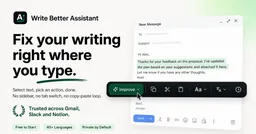
Write Better Assistant is a Chrome extension that shows a floating toolbar next to any selected text and rewrites it in place — no sidebar, no tab switching.
Actions include fixing spelling and grammar or making text professional, with a free tier covering daily use. It deliberately avoids Google Docs, Sheets, and Slides due to their custom editors.
A paid tier adds more daily usage and custom prompts for heavier writers.
What it can do
- Floating toolbar next to selected text
- In-place text replacement
- Spelling and grammar fixes
- Tone rewrites
- Free tier for daily writing
- Multi-language support
Setup
- Install Write Better Assistant from the Chrome Web Store.
- Select text on any supported site.
- Click an action in the floating toolbar.
- The fixed text replaces your selection in place.
Prerequisites
Chrome or Chromium browser.
Use cases
Works with
Trust score — 5/10
Scored 5/10 (metrics tier, metrics-v1). Evidence: Official site FAQ verified; free tier covers daily use per vendor; Google Docs/Sheets/Slides unsupported — stated limitation. License: Proprietary..
How the trust score is built
Full methodology →- Adoption · stars/downloads, log-scaled vs peers
- 3.0/10
- Maintenance · recency, releases, issue load
- 5.0/10
- Openness · license + docs
- 3.0/10
- Manual review · sanity read + red-flag check
- 5.0/10
- · Official site FAQ verified
- · free tier covers daily use per vendor
- · Google Docs/Sheets/Slides unsupported — stated limitation
Sources
Every fact above was checked against these sources. Where a claim comes from the provider and couldn't be independently verified, the text says so.